Touch ID, or your password
It uses macOS's own prompt, so it works with Touch ID, an Apple Watch where your Mac allows it, or your login password on a Mac without a sensor.
[ bitsandbytes presents ]
A small app locker for macOS. Choose the apps you want kept private, and opening one asks for Touch ID or your password first. It locks them again when they quit, after time away, when they're minimised, or when the Mac sleeps. For keeping Messages and Photos to yourself when someone borrows your Mac; read what it can't do before you rely on it.
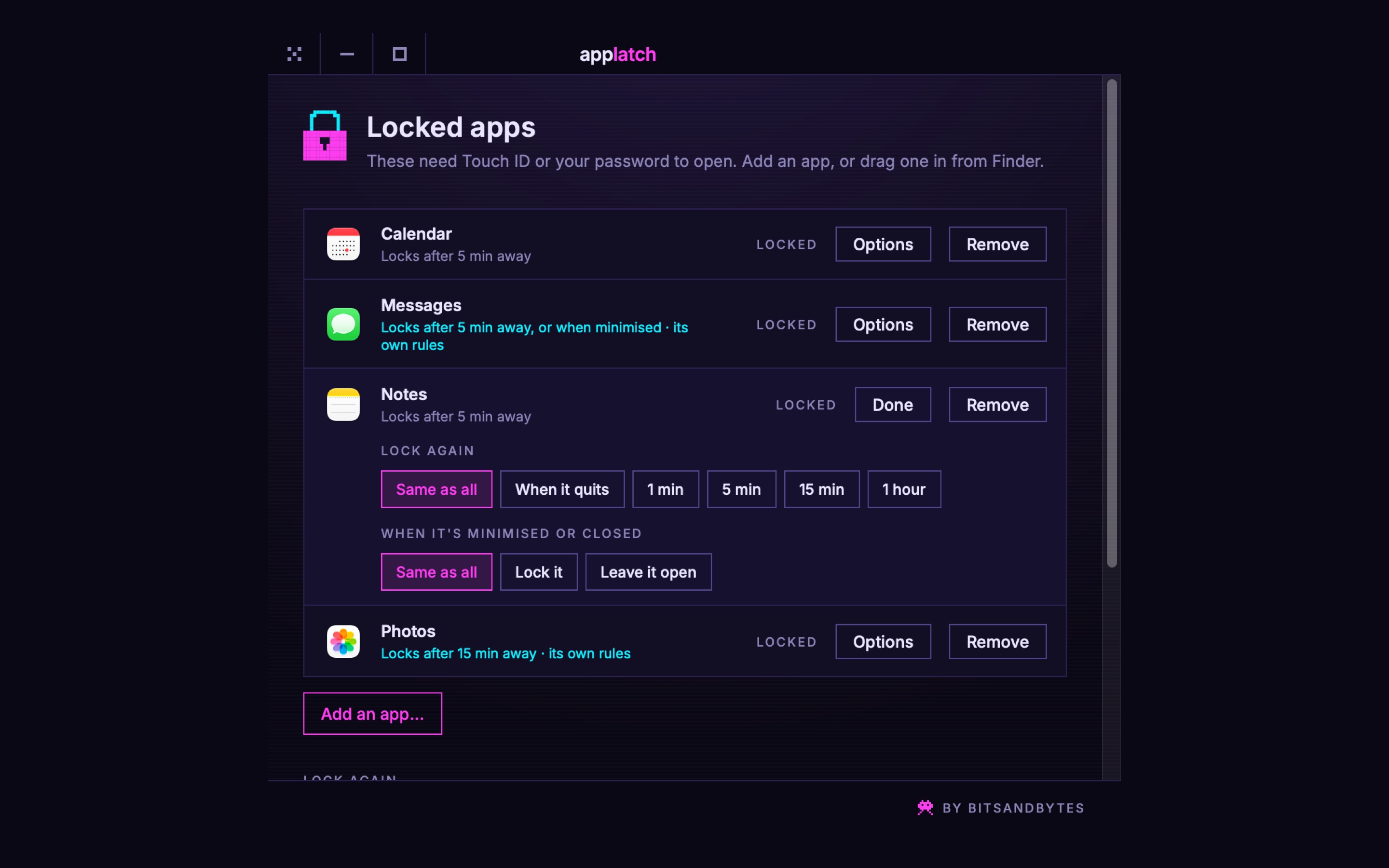
Add Messages, Photos, Notes, a browser: whatever you would rather nobody opened while they're borrowing your Mac.
AppLatch covers the screen before the app can be read and asks for Touch ID, or your Mac's password.
Unlock it and it carries on as normal. Turn it away and it quits, with nothing seen.
[ what it does ]
It uses macOS's own prompt, so it works with Touch ID, an Apple Watch where your Mac allows it, or your login password on a Mac without a sensor.
Always when the app quits. Optionally after 1, 5 or 15 minutes or an hour of not being the app in front, and when the Mac sleeps or the screen locks.
Optionally, as soon as none of an app's windows are left on screen. Bringing one back from the Dock asks for Touch ID again, and the Dock's preview of it is hidden too.
Messages can lock the moment it's minimised while a browser waits an hour. Every app follows the general rules unless you give it its own.
Changing the list and quitting AppLatch both need Touch ID, so nobody can simply untick an app. Unlocks are kept in memory only: restart and everything is locked again.
No Dock icon. The padlock shows each locked app and whether it's open right now, with Lock All Now (⌘L) for when you step away.
[ what it can't do ]
AppLatch is honest privacy, not a vault. Without a paid Apple developer certificate it can't use the part of macOS that stops apps before they start, so it works like this:
macOS only tells AppLatch about an app once it has started. AppLatch covers the screen and hides it within a fraction of a second, so nothing can be read or used, but the app is running behind the cover, and its Dock icon may bounce.
Quitting it from its own menu needs Touch ID, but anyone who knows to force-quit it from Activity Monitor or the Terminal gets past it. It keeps out people borrowing your Mac, not someone determined, and not anyone with your password.
Nothing is encrypted. Your photos, notes and messages are still files on the Mac, readable from Finder or another app, and on any other device signed in to the same account. For files, use FileVault and a strong login password.
If AppLatch isn't open, nothing is locked. Turn on "Open AppLatch when you log in" so it starts with the Mac. Command-line programs are not covered at all.
The aim is an AppLatch Pro that locks apps properly: a locked app is stopped before it ever starts, and force-quitting AppLatch doesn't open anything. That needs Apple’s Endpoint Security, a paid developer certificate and Apple’s approval, so there is no date yet. The free version will stay free.
[ in the app ]
[ installing ]
The first time only, macOS needs telling that AppLatch is allowed. This is Gatekeeper doing its job with an app that isn't notarised, not a fault.
Open AppLatch.dmg and drag AppLatch onto the Applications folder beside it.
Double-click AppLatch in Applications. macOS says it can't check it for malicious software, because it isn't signed with a paid Apple certificate yet. Choose Done, not Move to Bin.
Open System Settings → Privacy & Security, scroll down to Security, and click Open Anyway beside AppLatch. Confirm with Touch ID or your password, then Open. macOS remembers from then on.
Or, if you're happy in the Terminal, this does steps 2 and 3 in one go:
xattr -dr com.apple.quarantine /Applications/AppLatch.app
Then the padlock appears in the menu bar and the list opens. Add your apps, and tick “Open AppLatch when you log in” so they stay locked after a restart.
[ questions ]
Yes. No account, no trial, no subscription. It was written because the app locker it replaces stopped working.
No. AppLatch makes no network connections at all. Touch ID is checked by macOS itself; AppLatch only hears yes or no.
Because it isn't signed and notarised with a paid Apple Developer certificate yet, so Gatekeeper can't vouch for it. Follow the three steps under Installing; it's only needed the first time. On macOS 14 Sonoma, right-clicking the app and choosing Open does the same.
Enough to keep family, friends and colleagues out of your apps when they're using your Mac. Not enough to stop someone who knows what they're doing and has time alone with it: see what it can't do, above. A Pro version that can't be got past by force-quitting is planned, though there is no date yet.
Any app, including Apple's own: Messages, Photos, Notes, Mail. Finder can't be locked, since the Mac can't work without it.
macOS offers your login password instead, as it does for everything else that asks for Touch ID.
macOS is stricter about apps without a paid certificate starting by themselves. Make sure AppLatch is in Applications, try again, or add it by hand in System Settings → General → Login Items.
Choose Quit AppLatch from the padlock menu (it asks for Touch ID), drag AppLatch from Applications to the Bin, and delete the folder uk.bitsandbytes.applatch from ~/Library/Application Support.
macOS 14 Sonoma and later, on Apple silicon or Intel. One download covers both.
It is free because it was written for one Mac and there is no reason it should not run on yours. If it keeps something to yourself, there is a coffee button at the top of the page.