⌘S means save
No export sheet, no format quiz, no copy in a library you never asked for. The edit goes straight back into the file you opened, as the same kind of file, with its camera details and colour profile kept.
[ bitsandbytes presents ]
A quick photo editor for macOS. Right-click a photo in Finder, fix it, press ⌘S, and it is saved back where it was. No export dialog, no photo library, no account. Layers, text, shapes, paint, crop and colour when you need them, and the background gone in one click.
In Finder, Quick Actions → Edit with Imaginator. Or open the app for a blank canvas sized for a post, a story or a thumbnail.
Crop, straighten, brighten, caption, cut the background out. Every step can be undone.
Saved over the original, which is kept for thirty days in case you change your mind.
[ what it does ]
No export sheet, no format quiz, no copy in a library you never asked for. The edit goes straight back into the file you opened, as the same kind of file, with its camera details and colour profile kept.
The first save tucks the untouched photo away for thirty days, along with every layer you made. Revert to Original works after you have quit, and reopening the photo brings its layers back, still editable.
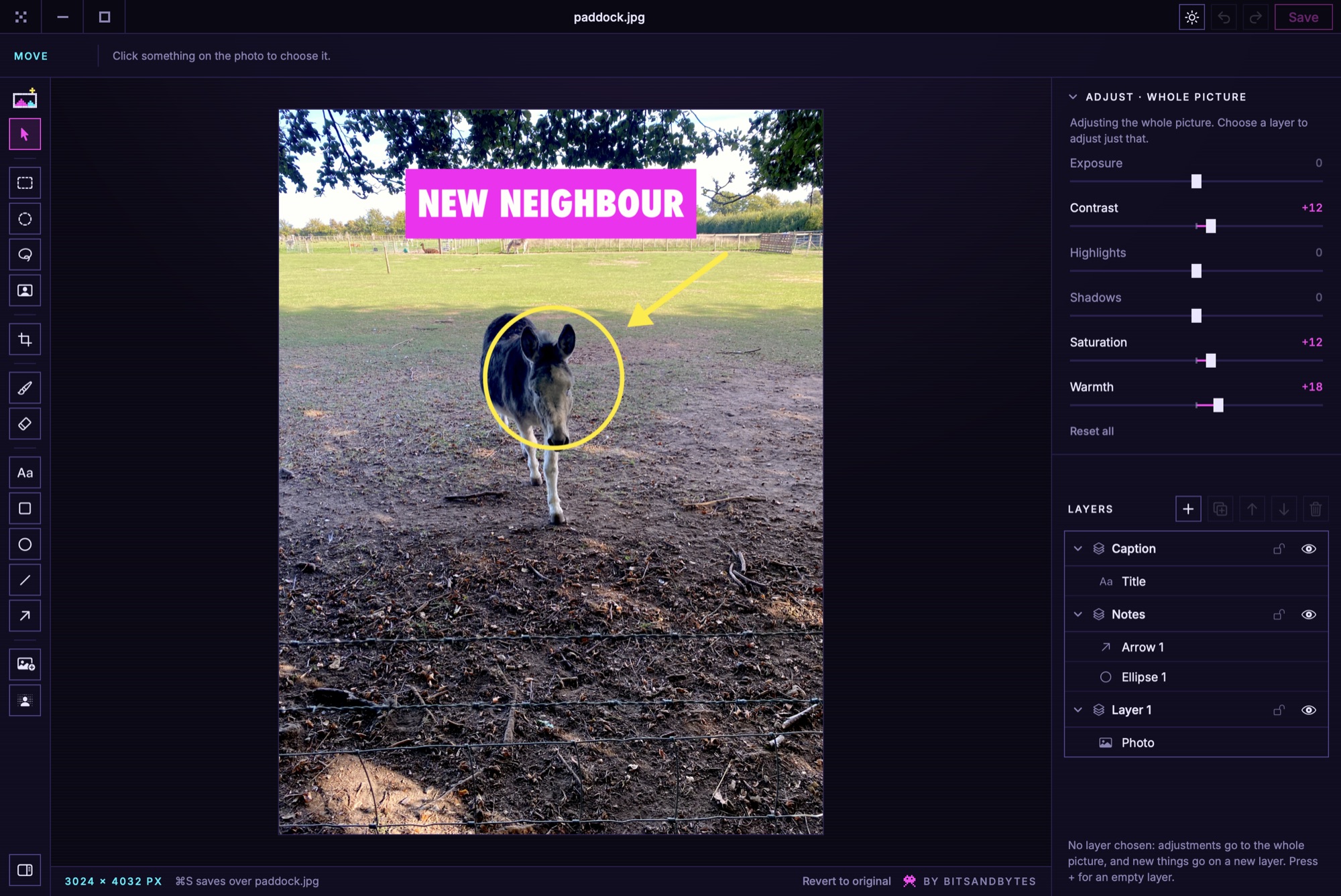
The photo sits on Layer 1 like anything else. Add layers, and put text, shapes, other pictures, paint and lifted selections on them. Hide, lock, reorder, set the opacity, and adjust the light and colour of one layer or the whole picture.
Select a rectangle, an ellipse, a hand-drawn lasso, or just the subject, and it lifts onto its own layer with the photo left whole underneath. Then move it, resize it, turn it.
The Mac's own on-device model finds the subject and takes the rest away. Nothing is uploaded. A JPEG can't hold a see-through background, so that save becomes a PNG beside the original rather than a quiet fill of white.
Captions in five faces with a block behind them, rectangles, ellipses, lines and arrows for pointing things out, and a brush and eraser with size and softness. The eraser only ever rubs out the layer it is on.
Square, portrait, story, widescreen, photo and classic shapes, turns, flips, and straighten up to 45° either way, cut to the largest rectangle that fits so no empty corners show.
Tools down the left with the single keys you already know (V, M, L, C, B, E, T, U), the tool's settings across the top, and the layers always on the right. Light and dark, following your Mac.
[ in the app ]
[ guides ]
Fix a photo where it already is and save it with ⌘S: no Export sheet, no importing into Photos, and the original kept in case you change your mind.
Two free ways on a Mac: the one built into Finder for a quick cut-out, and Imaginator when you want to keep working on it. Nothing is uploaded either way.
Stories are 9:16, ideally 1080 × 1920. Here's how to crop to exactly that shape on a Mac, straighten it, and save it in one go.
[ questions ]
Yes. No account, no trial, no subscription. It was written because Preview makes you export and Photos makes you import, and editing a photo where it already is should take one keystroke.
The first time you save over a photo, Imaginator keeps the untouched original for thirty days, and File → Revert to Original puts it back, even after you have quit. Saving is also all-or-nothing: the new file is written in full beside the old one and swapped in only once it is complete.
No. Background removal and subject selection use the model built into macOS. There is no account, no telemetry and no server.
The file gets the finished picture, flattened, so it opens anywhere. The layers are kept alongside the original for thirty days, so reopening the photo in Imaginator brings them back to carry on with. If the file has been changed in another app since, it opens as it now is.
Because it is not signed with a paid Apple Developer certificate yet. The first time, open it and choose Done, then go to System Settings → Privacy & Security and click Open Anyway beside it; macOS remembers from then on. On macOS 14 Sonoma, right-clicking the app and choosing Open does the same. That is Gatekeeper doing its job, not a fault.
macOS 14 and later, on Apple silicon or Intel. One download covers both.
It is free because it was written for one Mac and there is no reason it should not run on yours. If it saves you an afternoon, there is a coffee button at the top of the page.